
How to Submit a Background Check Requirement in GotSport

This article will show how a Manager or Coach can submit a background check.
Instructions:
Step 1:
Log in to your account.
Step 2:
You will now be redirected to your dashboard.
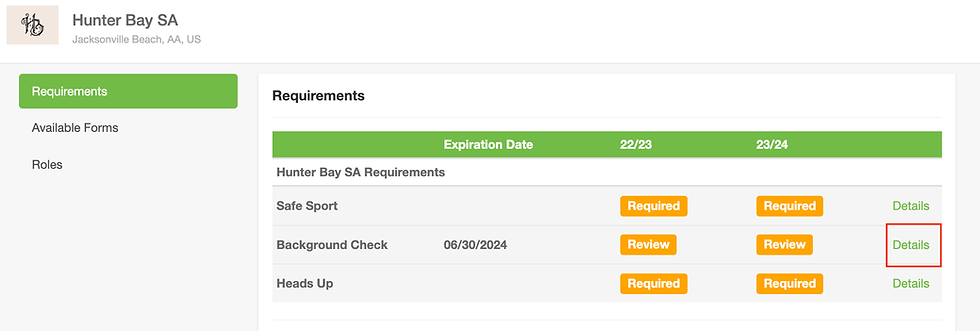
If you are viewing your personal information, click on DASHBOARD in the menu bar. Once on your dashboard, click on DETAILS next to the background check requirement.
Step 3:
Click on Submit New Report

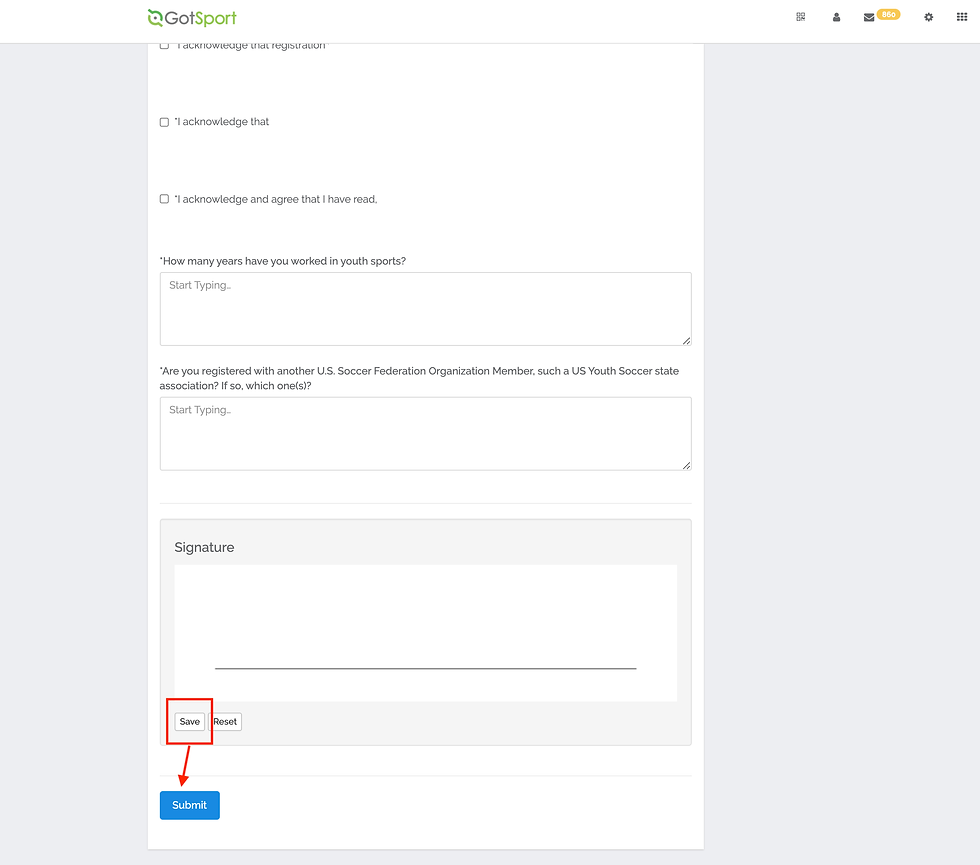
Fill out all information, review all acknowledgments, and click the checkbox for each acknowledgment if you agree.
Sign your name on the signature line (works with mouse or touchscreen) and save your signature.
Lastly, click SUBMIT on the bottom of the page to submit your report.

Step 4:
Submit payment.
Click "Credit Card Checkout" input your credit card information
Click the "Yes Agree To Payment Terms" button, and click Pay.

